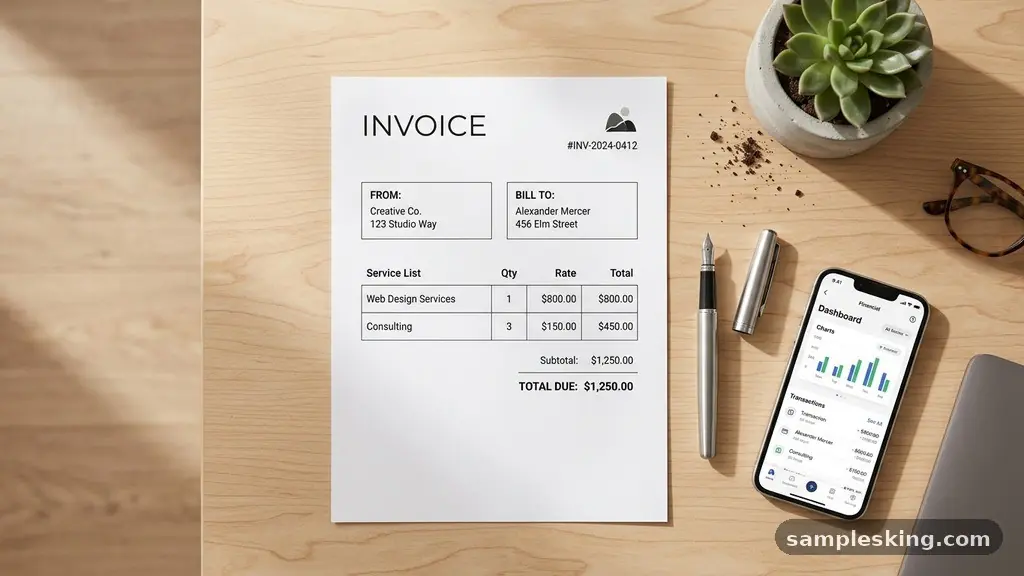
Creating a Professional Invoice Template is one of the most effective ways to stabilize your cash flow and project a polished image to your clients. A well-structured document does more than just request payment; it serves as a legal record and a reflection of your commitment to quality. By mastering the essential components of billing, you reduce the likelihood of disputes and encourage faster processing times.
This article explores how to design a document that balances clarity, compliance, and your own unique branding to ensure your accounts receivable process remains efficient and stress-free. You will learn exactly what to include to avoid common pitfalls that delay your revenue.
The Essential Components of Your Invoice
Every invoice must contain specific pieces of information to be legally valid and easily processed by a client’s accounting department. At the very top, you must include your business contact information, including your full name or company name, address, phone number, and email.
Equally important is the client’s contact information, which ensures the document reaches the correct department. Without these details, your bill may sit in an inbox indefinitely while a clerk tries to identify the sender.
You must also include a unique invoice numbering system to track your income over time. Using a simple sequential format, such as INV-001, helps you organize your records and makes it easier to reference specific transactions during tax season.
Never reuse a number, as this can lead to confusion in your bookkeeping. Including your tax identification number is another vital step for compliance, especially if you are working with corporate clients who require it for their own financial reporting.
Structuring Your Line Items for Clarity
The body of your invoice is where you detail exactly what the client is paying for. Each service description should be concise but specific enough that there is no room for ambiguity. Avoid generic terms like “consulting” or “work performed.”
Instead, use descriptive language such as “Q3 Social Media Strategy Audit” or “Website Maintenance – October 2023.” This level of detail justifies your price and prevents the client from questioning the value of your work.
When organizing your line items, keep a clear grid format that shows the quantity, unit price, and total cost for each task. If you have provided a mix of hourly services and flat-fee deliverables, consider grouping them under separate headers to improve readability.
Providing a subtotal before adding taxes or additional fees makes the math transparent. Transparency is the best way to build trust and ensure your invoice is approved on the first pass.
Setting Clear Payment Terms
Defining your payment terms is the most effective way to manage expectations regarding when you expect to be paid. Many freelancers and small businesses default to net 30, which means the client has 30 days from the date of the invoice to submit payment.
If you prefer a faster turnaround, you might opt for net 15 or “due upon receipt.” Whatever you choose, ensure it is clearly stated in a prominent position on the document.
You should also include a section detailing your accepted methods of payment. If you use a specific payment gateway, provide a direct link or instructions on how to access the portal.
Clearly outlining your policy on late payment fees can also act as a deterrent for slow payers. While you may not always enforce these fees, having them written into your terms gives you a formal basis to collect when a payment is significantly delayed.
The Importance of Branding Elements
Your invoice is a marketing touchpoint, even if it is a financial document. Including branding elements like your company logo, a professional color palette, and a consistent font makes your business look established and reliable.
A plain, generic document can look like a template downloaded from a random site, while a branded one looks like a deliberate extension of your professional identity. Consistency across your quotes, contracts, and invoices builds recognition.
Keep the design clean and avoid clutter. Use white space effectively to draw the eye to the most important figures, such as the total amount due and the due date.
While you want your invoice to look professional, it should never sacrifice readability for aesthetics. Ensure your fonts are large enough to be read easily, particularly when the document is printed or viewed on a mobile device.
Choosing the Right File Format
Always send your invoices in a universally readable format. The industry standard is the PDF format, as it prevents the recipient from accidentally altering the numbers or the layout of your document.
A PDF looks identical on every device, whether the client is using a desktop computer or a smartphone. Avoid sending raw spreadsheets or word processor files that might lose their formatting when opened in different software.
If you are working with international clients, you must account for currency conversion. Clearly state which currency the invoice is denominated in to avoid any confusion regarding the amount owed.
If you are using international payment systems, check that your invoice reflects the total amount the client needs to send, accounting for any potential intermediary bank fees. This attention to detail prevents the “short pay” scenario where you receive less than the invoiced amount.
Leveraging Modern Billing Software
While you can create a professional invoice template in a basic word processor, transitioning to dedicated billing software can save you significant time. Most modern platforms allow you to automate recurring invoices, track the status of sent documents, and send automatic reminders to clients whose payments are nearing their due date.
This reduces the administrative burden of chasing payments manually. Many platforms also offer features like a digital signature, which can be useful if the invoice requires a formal sign-off before payment is released.
To help you compare the different ways of managing your billing, consider the following table. It outlines the differences between manual and automated approaches to invoicing.
| Feature | Manual Template | Billing Software |
|---|---|---|
| Setup Time | Low (One-time) | Moderate (System setup) |
| Automation | None | High (Recurring/Reminders) |
| Tracking | Manual Spreadsheet | Real-time Dashboard |
| Cost | Free | Subscription Fee |
Common Mistakes to Avoid
Even experienced business owners can fall into traps that delay their income. One of the most common errors is failing to include a clear “Due Date.” Without a specific date, clients may treat your invoice as a low-priority task.
Another mistake is using vague descriptions that force the client to call you for clarification. Every phone call or email exchange required to explain an invoice is an opportunity for the payment process to stall.
Be careful with your record-keeping. Losing track of your sent invoices or failing to mark them as paid can lead to double-billing or awkward conversations with clients who have already paid. It is also important to double-check your math before sending.
A simple calculation error can make you look unprofessional and significantly slow down the approval process in a corporate accounting department. You can find more information on best practices through the Internal Revenue Service website regarding business record-keeping requirements.
Frequently Asked Questions
How often should I update my invoice template?
You should review your template at least once a year. Ensure your contact information is current and that your payment terms still align with your business needs. If you change your logo or brand identity, update your template to match.
Is it necessary to include a digital signature on an invoice?
Generally, a digital signature is not required for a standard invoice. However, if your contract requires a formal sign-off on delivered work before payment is released, a digital signature can speed up the approval process.
What should I do if a client ignores my invoice?
Start by sending a polite follow-up email a few days before the due date. If the date passes, send a formal reminder that includes the original invoice attached. If the delay continues, reference your late payment fees as outlined in your contract.
Can I use a free online template?
Yes, many free templates are perfectly adequate for small businesses. Just ensure the template is customizable enough to include all your necessary business details and that you export it as a secure file type like a PDF.
What is the benefit of using an invoice numbering system?
A consistent numbering system helps you organize your financial records for tax purposes. It makes it easy to identify which invoices remain unpaid and provides a clear audit trail if you are ever reviewed by tax authorities.
Establishing Your Financial Workflow
Consistency is the secret to getting paid on time. Develop a habit of sending your invoices immediately upon the completion of a project or at the agreed-upon milestone.
Waiting until the end of the month to batch your billing can create a “feast or famine” cycle that makes financial planning difficult. By creating a system where your invoicing process is predictable and timely, you signal to your clients that your business is run with professionalism and care.
When you invest time in creating a Professional Invoice Template, you are essentially investing in your own financial health. A well-designed document eliminates confusion, sets clear boundaries, and helps you keep track of your hard-earned money. Take the time to refine your template and your billing workflow today, and you will see the benefits in your bank account tomorrow.
If you have questions about specific legal requirements for your industry, it is always wise to consult with a local accountant or business advisor. Stay organized, stay professional, and keep your business moving forward.